SpeedHalo review: Android GPS speedometer and trip recorder
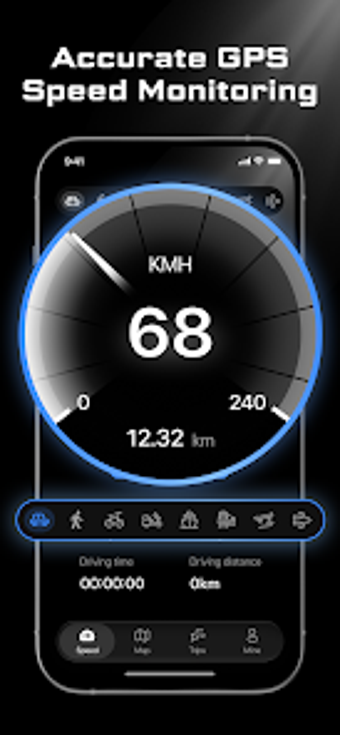
SpeedHalo, developed by Shapley, turns an Android phone into a focused dashboard for monitoring speed and logging journeys. The app provides a live GPS speedometer with unit support and a trip history system that records routes and travel statistics. It also offers HUD projection for windshield viewing, Picture-in-Picture for multitasking, and configurable speed alerts. Drivers, cyclists, boaters, and travelers gain a compact secondary speed readout and saved trip data for later review.
What the app does and what it records
SpeedHalo converts a smartphone into a live speedometer and trip logger by reading the device GPS. The app reports speed in both MPH and KM/H and stores mapped routes alongside concrete trip metrics. Recorded items include top speed, average speed, total distance, duration, and start/end locations, presented in a trip history view that users can consult after each run.
How it interacts with the device and other apps
As an Android utility, the app requires active GPS to produce real-time speed. It supports Picture-in-Picture mode so a compact speed panel remains visible while another app runs, which keeps the readout accessible during navigation. A dedicated HUD mode mirrors the display for windshield reflection, an option designed specifically for lower-light driving conditions rather than daytime glare management.
Safety features and behavior across transport modes
SpeedHalo includes configurable speed limit alerts that trigger a vibration notification when a threshold is exceeded, a direct safety affordance for maintaining desired speeds. The tool provides presets for several movement modes, for example Car, Motorcycle, Bicycle, Boat, and Train, so the readout and alerts align with expected speed ranges for each activity.
Who can operate it and accessibility considerations
The app uses high-contrast, readable dashboard styles to keep information legible at a glance, which reduces setup friction for nontechnical users. Preset movement modes and simple alert settings mean most users can start tracking without custom calibration, while people who want more control can adjust thresholds and review detailed trip logs for post-activity analysis.
Practical choice for users needing a secondary speed display
SpeedHalo is a practical option for users who need a compact GPS speedometer and journey logging on Android devices, and its Play Store ratings suggest steady user approval. Expect utility tied to the phone’s GPS reception and to correct device placement when using projection modes. For anyone who wants a readable secondary speed readout and saved trip statistics, SpeedHalo is a reliable, purpose-built tool. Recommended.